Macromedia Flash Portable

Kamis, 07 Agustus 2008


Setelah beberapa link software portable yang telah sediakan, antara lain, Microsoft Windows Home Edition Portable, CorelDraw 11 portable, dan Adobe Photoshop CS Portable, kini kami kembali hadir untuk menyediakan link Macromedia Flash 8 Portable yang bisa anda download secara gratisan. Hampir semua fitur yang ada di macromedia flash 8 versi installasi itu ada dalam versi yang portable ini. Bisa langsung didownload di :


http://rapidshare.com/files/34611826/MacromediaFlash8Portable.rar
passwordnya : WWW.HEARTODARK.COM


Selamat Mencoba !! :D


Sumber dari situs Ilmu Website dalam kategori flash dengan judul Macromedia Flash 8 portable Pro

Huna Cinta Javascript

--------------
Script ini hanya jalan di Internet Explorer
--------------

contoh buka: http://www.ilmuwebsite.com/javascript/hujan-cinta.htm

<html>
<head>
</head>
<body bgcolor="black">

<body>
<!-- file "ani_heart.gif" bisa kamu ganti sendiri terserah -->
<script language="JavaScript1.2">

<!-- Begin
var no = 12; // number of hearts
var speed = 10; // smaller number moves the hearts faster
var heart = "ani_heart.gif";
var flag;
var ns4up = (document.layers) ? 1 : 0; // browser sniffer
var ie4up = (document.all) ? 1 : 0;

var dx, xp, yp; // coordinate and position variables
var am, stx, sty; // amplitude and step variables
var i, doc_width = 800, doc_height = 600;
if (ns4up) {
doc_width = self.innerWidth;
doc_height = self.innerHeight;
} else if (ie4up) {
doc_width = document.body.clientWidth;
doc_height = document.body.clientHeight;
}
dx = new Array();
xp = new Array();
yp = new Array();
amx = new Array();
amy = new Array();
stx = new Array();
sty = new Array();
flag = new Array();
for (i = 0; i < no; ++ i) {
dx[i] = 0; // set coordinate variables
xp[i] = Math.random()*(doc_width-30)+10; // set position variables
yp[i] = Math.random()*doc_height;
amy[i] = 12+ Math.random()*20; // set amplitude variables
amx[i] = 10+ Math.random()*40;
stx[i] = 0.02 + Math.random()/10; // set step variables
sty[i] = 0.7 + Math.random(); // set step variables
flag[i] = (Math.random()>0.5)?1:0;
if (ns4up) { // set layers
if (i == 0) {
document.write("<layer name=\"dot"+ i +"\" left=\"15\" ");
document.write("top=\"15\" visibility=\"show\"><img src=\"");
document.write(heart+ "\" border=\"0\"></layer>");
} else {
document.write("<layer name=\"dot"+ i +"\" left=\"15\" ");
document.write("top=\"15\" visibility=\"show\"><img src=\"");
document.write(heart+ "\" border=\"0\"></layer>");
}
} else
if (ie4up) {
if (i == 0) {
document.write("<div id=\"dot"+ i +"\" style=\"POSITION: ");
document.write("absolute; Z-INDEX: "+ i +"; VISIBILITY: ");
document.write("visible; TOP: 15px; LEFT: 15px;\"><img src=\"");
document.write(heart+ "\" border=\"0\"></div>");
} else {
document.write("<div id=\"dot"+ i +"\" style=\"POSITION: ");
document.write("absolute; Z-INDEX: "+ i +"; VISIBILITY: ");
document.write("visible; TOP: 15px; LEFT: 15px;\"><img src=\"");
document.write(heart+ "\" border=\"0\"></div>");
}
}
}

function snowNS() { // Netscape main animation function
for (i = 0; i < no; ++ i) { // iterate for every dot
if (yp[i] > doc_height-50) {
xp[i] = 10+ Math.random()*(doc_width-amx[i]-30);
yp[i] = 0;
flag[i]=(Math.random()<0.5)?1:0;
stx[i] = 0.02 + Math.random()/10;
sty[i] = 0.7 + Math.random();
doc_width = self.innerWidth;
doc_height = self.innerHeight;
}
if (flag[i])
dx[i] += stx[i];
else
dx[i] -= stx[i];
if (Math.abs(dx[i]) > Math.PI) {
yp[i]+=Math.abs(amy[i]*dx[i]);
xp[i]+=amx[i]*dx[i];
dx[i]=0;
flag[i]=!flag[i];
}
document.layers["dot"+i].top = yp[i] + amy[i]*(Math.abs(Math.sin(dx[i])+dx[i]));
document.layers["dot"+i].left = xp[i] + amx[i]*dx[i];

}
setTimeout("snowNS()", speed);
}

function snowIE() { // IE main animation function
for (i = 0; i < no; ++ i) { // iterate for every dot
if (yp[i] > doc_height-50) {
xp[i] = 10+ Math.random()*(doc_width-amx[i]-30);
yp[i] = 0;
stx[i] = 0.02 + Math.random()/10;
sty[i] = 0.7 + Math.random();
flag[i]=(Math.random()<0.5)?1:0;
doc_width = document.body.clientWidth;
doc_height = document.body.clientHeight;
}
if (flag[i])
dx[i] += stx[i];
else
dx[i] -= stx[i];
if (Math.abs(dx[i]) > Math.PI) {
yp[i]+=Math.abs(amy[i]*dx[i]);
xp[i]+=amx[i]*dx[i];
dx[i]=0;
flag[i]=!flag[i];
}

document.all["dot"+i].style.pixelTop = yp[i] + amy[i]*(Math.abs(Math.sin(dx[i])+dx[i]));
document.all["dot"+i].style.pixelLeft = xp[i] + amx[i]*dx[i];
}
setTimeout("snowIE()", speed);
}

if (ns4up) {
snowNS();
} else if (ie4up) {
snowIE();
}
// End -->
</script>
</center>
</body>
</html>

Sumber dari situs Ilmu Website dalam kategori javascript dengan judul Hujan Cinta

Cool 3D Logo


bwat bikin 3d di photoshop itu sbnernye gampang banged, hmm... kata tmen2 sih rada susah, tapi ada banyak carana, ke tutorial ini niiii... nyok kita bikin logo bernuansa 3d


siapin canvas 400 x 400 px.


ambil salah satu shape di photoshop. gambar objek na.


COWO BANGET kan ??? gagagaagagakakkkkk :D


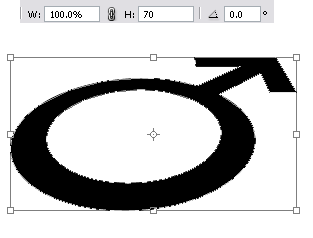
transform pake perspektiv ...


teken enter.


transform lagi, tapi kali ini khusus tinggina sajah, menjadi 70 %


enter juga


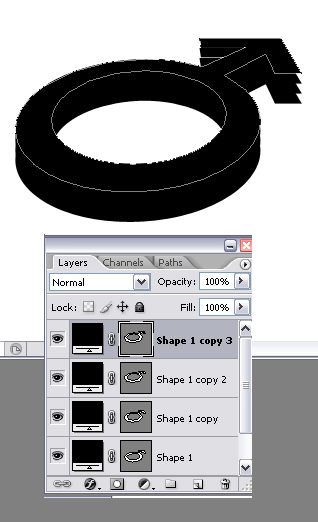
duplikat sekali, geser make panah ke atas. ulangi ampe beberapa kali, jadi keliatan tebel 3d na


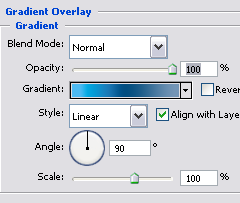
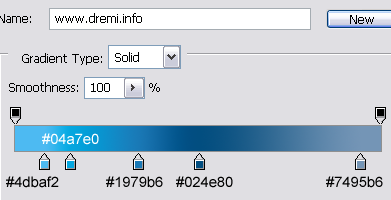
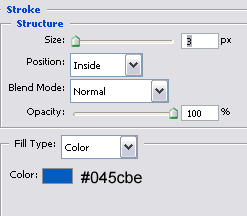
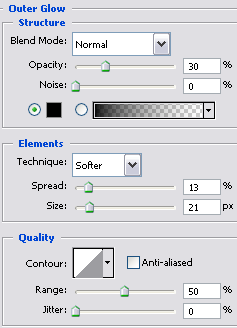
klik pada layer teratas, kasi style ke gini:


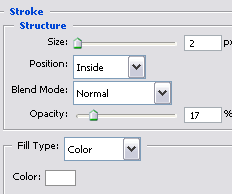
woke, beralih ke base shape paling dasar. kasi style juga


untuk kesan glossy, kasi gradasi transparent. [CTRL+Click] pada layer shape paling atas, pilih menu Select > Modify > Contract ( 2px )


kurangi opacity na....


delete sebagian gradasi make marquee tool....


ubah blending mode layer menjadi overlay


jadi dah... hahahahakkk


© Copyright 2008 www.dremi.info Original Post: Cool 3D Logo Category: Interface
About the Author: dr.emi is a free man to distribute anything that he was founded. As a Webmaster He was publishing www.dremi.info to create one community that loves free idealism. Very specialy in Design Category. Welcome to love it!


Sumber dari situs Ilmu Website dalam kategori photoshop dengan judul Cool 3D Logo

Membuat Box Style Link Cantik ala dr.emi dengan CS

Membuat Box Style Link Cantik ala dr.emi dengan CSS

Jimanee nDesign box link cantik dengan menggunakan CSS ?

Pernah liat page link nyang ada di :
http://www.dremi.info/tutorial/photoshop-forum.php ???

nah bagian paging na gw pake CSS bwat bikin box link na, kali ini kita bikin nyang sama tapi dengan style CSS nyang berbeda.

Simple aja mulai dengan style ke gini:

<style>
#pagin a
{
font-family:Tahoma;
font-size:11px;
display:block;
float:left;
cursor:pointer;
color:#00c;
text-decoration:none;
display:inline-block;
border:1px solid #ccc;
padding:.3em .7em;
margin:0 .38em 0 0;
text-align:center
}
#pagin a:hover
{
background:#f0f7e8;
border:1px solid #83bc46
}
#pagin a.sel
{
color:#333;
font-weight:normal;
background:#f0f7e8;
cursor: default;
border:1px solid #83bc46
}
</style>

Tros terapkan ke dalam halaman HTML lu:

<div id="pagin">
<a class="sel">1</a><a href="http://csslovers.co.cc">2</a>
<a href="http://dremi468.blogspot.com">3</a>
<a href="http://dremi.info/tutorial/photoshop-forum.php">4</a>
</div>

heehe jadi dah, lagi lagi tutorial CSS na singket !!! biarin weks :P !!

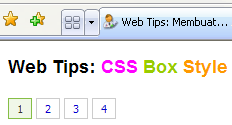
Penasaran kan mao liat hasilna ?? klik ajah link dibawah ini, bwat preview hasilna:

http://www.dremi.info/web/tips/css-box-style-design.html

Tros kalo mao download disini:

http://www.ziddu.com/download/1774822/css-box-style-design.rar.html

Thanks, dr.emi

Thanks to brotherhood and sister of ilmuwebsite.com

Bwat ephi.... opo iku boooyoooo ??????? gyaahahahahahhahahaha :P


Sumber dari situs Ilmu Website dalam kategori html dengan judul Membuat Box Style Link Cantik ala dr.emi dengan CS

Membuat Logo Pada AdressBar


Favicon adalah icon kecil yang ada di url address bar, bisa juga masuk dalam daftar bookmark jika kita mem bookmark suatu situs yang mempunyai Favicon, untuk ukurannya favicon sendiri adalah 16 x 16 pixel.

Berikut tutorial nya bagaimana cara membuat Logo pada URL Address Browser:
caranya siapkan icon favorite anda, download icon-icon dibawah ini:

http://www.webdeveloper.com/favicon.ico
http://www.oscmax.com/favicon.ico
http://www.coffeecup.com/favicon.ico
http://unblock-url.qarchive.org/favicon.ico
http://www.pizzahut.com/favicon.ico
http://www.starbucks.com/favicon.ico


Setelah itu silahkan klik kanan salah satu icon, lalu pilih Save Image As.. -> lalu save
Cara pemasangannya bisa anda Upload dan letakkan di direcrtory root dengan nama: favicon.ico

atau bisa juga letakkan tag di bawah ini dalam header anda
<head>
....
<LINK REL="SHORTCUT ICON" HREF="http://www.yourwebsite.com/favicon.ico" />
</head>

Sumber dari situs Ilmu Website dalam kategori html dengan judul Membuat Logo Pada Addres Bar

Free Web Hosting


Selamat siang semuanya, kali ini saya akan coba menunjukkan suatu kombinasi yang efektif, efisien, sempurna dan gratis...
Tutorial ini merupakan rangkuman dan gabungan dari dua tutorial sebelum nya, yaitu domain gratis dan hosting gratis...

Dari hasil riset saya selama 3 hari mengenai perpaduan domain gratis dan hositng gratis, saya menemukan titik temu yang sempurna.

Pertama target riset saya lakukan terhadap dua penyedia domain redirection gratis yaitu uni.cc dan co.cc, setelah saya teliti ternyata mereka berdua menyediakan "modify DNS", ya... "modify DNS" adalah fasilitas untuk mengarahkan DNS domain ke hosting kita, feature ini sangat bagus mengingat penyedia free domain redirection yang lain hanya memberikan redirection biasa seperti domain gratis co.nr atau domain gratis .tk dan hanya sebatas cloaking...(Cloaking tidak efektif dan dibenci google).

Selanjutnya adalah mencari hosting gratisan yang cocok dan bagus, saya mencoba 3 free hosting, sebagai test.., mereka yaitu :

Hosting Gratis:
1. 50webs.com
2. 000webhost
3. Freehostia.com

Test penggabungan co.cc dengan 50webs.com, DNS saya arahkan ke 50webs.com, pihak co.cc ok..!!, tapi setelah saya cek ternyata pihak 50webs.com memberikan "0" addon domain (alias tidak mengizinkan "addon domain", katanya sih harus upgrade ).... Test gagal..

Test penggabungan co.cc dengan 000webhost berjalan lancar hanya dengan beberapa jam saja, domain co.cc sudah konek dengan hosting 000webhost. Begitu juga dengan Freehostia, mereka juga bisa konek.

Caranya co.cc dg 000webhost:

  1. Anda register dulu di uni.cc: https://www.co.cc/regist/regist_account.php?go_url=/my_account/my_account.php
  2. Setelah register anda login, pilih salah satu website anda ex: narutopicture.co.cc
  3. Klik tombol "Set up", lalu masukkan dns1.000webhost.com dalam kotak Name Server1 dan dns2.000webhost.com dalam kotak Name Server2.
  4. Anda register ke 000webhost: http://www.000webhost.com/order.php
  5. Masukkan domain co.cc anda ex: narutopicture.co.cc ke kotak: I want to host my own domain (domain must be registered already).
  6. Lalu anda isi form-form yang lain sesuai dengan data anda, dan submit
  7. Tunggu 24 Jam dan Jadi deh....
Caranya uni.cc dg Freehostia:
  1. Anda register dulu di uni.cc, lalu DNS nya uni.cc arahkan ke Free Hostia (freehostia.com), Name Server-nya ada, lihat saja pada menu Addon Domain
  2. Lalu pada cPanel Free Hostia (freehostia.com) pilih Addon Domain, masukkan domain kamu tadi, ex: ilmuwebsite.uni.cc (tanpa www)
  3. Tunggu 24 Jam dan Jadi deh....
Silahkan coba..Gratis..

Update:
Setelah saya perhatikan uni.cc meminta anda untuk memasang banner mereka, jika tidak maka domain uni.cc anda akan di hapus.
Teman2 juga lebih banyak yang suka dengan co.cc daripada uni.cc
Sumber dari situs Ilmu Website dalam kategori html dengan judul Tutorial Ultimate Mendapatkan Website Gratis Full

Free Webosting

It's easy to find a free web hosting provider many of these providers are free, but require you to place advertising on your site. Free web hosting free webhosting, free domain names, dns tools, file hosting services, search engine information and seo consultancy are provided by freespace australia. Freewebspace.net - the largest guide to free webhosting welcome back your last visit was: today, 06:07 pm free web hosting, no ads latest news: power distribution change reboot after 8pm pst on saturday may 31, 2008. Free web hosting, free asp hosting, asp web hosting service -- 100m 50webs provides professional web hosting as well as a free hosting plan you can host up to five domain names in the webmaster hosting account benefit from our bonus and register. Top 10 web hosting, compare web hosting, best web hosting, web hosting 100webspace provides up to 100 mb of web space for free, php, cgi, frontpage and perl support, mysql databases, as well as 10 gb of web space for you to host unlimited domains for.

Free web hosting, no ads top-10-web-hosting.com is a free service to the public below are the 10 best, most reliable and affordable web hosting companies reviewed by experienced webmasters and ranked. Free web hosting freewebspace.net is the largest searchable guide to free web hosting to find a free webhost, use the simple search below or the advanced free hosting search. Free web hosting, free domain hosting, free web hosting with no ads we offer free asp web hosting for individuals and small business features include 100mb web space for you website, asp, ftp access, no ads, windows 2003 completely free web. 100webspace - free web hosting service and web space profuse host provides free web hosting with 2 gb of free webspace and 100 gb of free bandwidth for small business and individuals.